Choose captions that match the services you want to show.
Makeup Artists
Makeup Artists Social Media Content Kit
Digital download12 PDFs + editable master DOCX13 files total
1 / 4
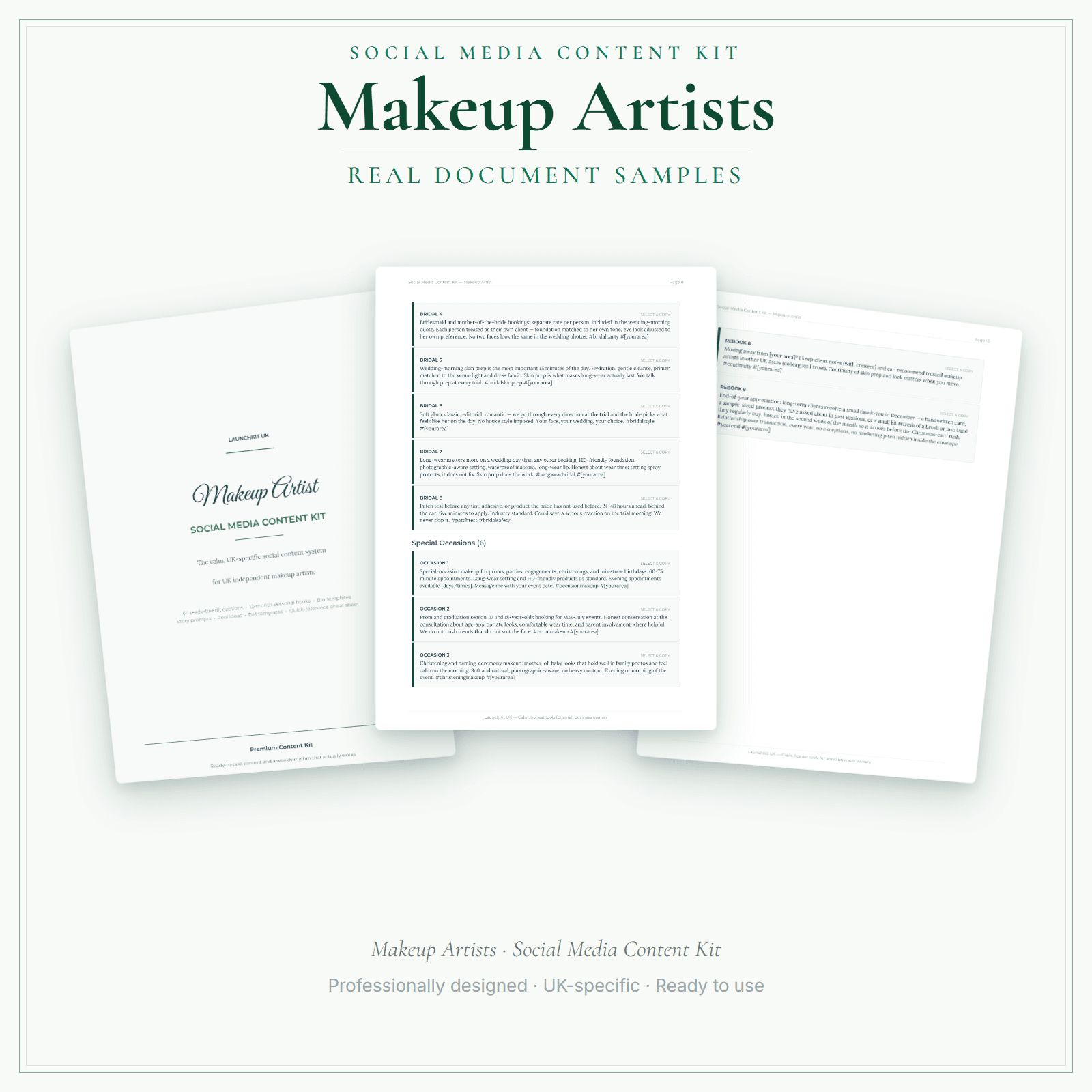
You know social media matters. The makeup artists in your area who post regularly stay visible when a bride starts trial-booking eight weeks out, when a prom mum scrolls on a Tuesday night, or when a photographer is looking for an artist to recommend for a Saturday engagement shoot. But between bridal trials, wedding mornings, kit resets, and patch-test reminders, sitting down to write a caption is the last thing on your list — you open the app, think "I should post that trial look from this morning," close it again, and a month goes by while the daylight photos sit untouched. This kit removes that problem. You get 64 ready-to-edit captions covering the work you actually do — bridal and trials, special occasions and proms, editorial and content shoots, skin prep and long-wear, lessons and one-to-ones, trust and standards, local and community, bookings, rebooking and reviews. Plus 10 fully scripted Reels, a 4-week posting calendar, bio templates for Instagram, Facebook and Google Business, DM and reply templates, seasonal hooks across the full year, and a localisation worksheet that makes every caption sound like your kit, not a template. Use the localisation worksheet as a reference, then edit the supplied master DOCX to apply your confirmed business details to the captions you choose. This static download does not update every caption automatically. Your download contains 13 files: 00 Start Here PDF, 10 section PDFs, 1 complete master PDF and 1 editable master DOCX.
64 ready-to-edit captions — organised by topic: bridal and trials, special occasions and proms, editorial and content shoots, skin prep and long-wear, lessons and one-to-ones, trust and standards, local and community, bookings, rebooking and reviews
4-week posting calendar — a day-by-day schedule that tells you exactly what to post and when
Localisation worksheet: record your confirmed business details as a reference, then use the editable master DOCX to personalise the captions you choose manually
Preview pages
Preview what's inside
In the pack
What's included
- 00 Start Here
- 01 Strategy Guide
- 02 Caption Library
- 03 Seasonal Hooks + Bios
- 04 Templates + DMs
- 05 Stories + Reels
- 06 Cheat Sheet + Platform Notes
- 07 Posting Calendar
- 08 Scripted Reels
- 09 Localisation Worksheet
- 10 Photo Checklist + Rescue Guide
- Master PDF
- Master DOCX
Preview pages
Made for the work
Put this product to work.
Plan posts using the caption bank, reel scripts and calendar. Adapt the chosen text in the master Word document and add your own photos or footage before publishing.
Start with a task such as:
Adapt a reel script to footage you can record.
Arrange the posts you choose in your content calendar.
- Instant download
- Built in the UK
- One-time purchase
- Secure checkout
- Refund policy
- Support by email
Frequently Asked Questions
How do I receive Social Media Content Kit?
After payment, look for your LaunchKit download email in the inbox you used at checkout. Open its link to your download page and download the files listed for your order. You'll receive 13 files: 00 Start Here PDF, 10 section PDFs, 1 complete master PDF and 1 editable master Word (DOCX) file. Use the localisation worksheet as a reference, then manually adapt the captions you choose in the master DOCX; the static files do not update every caption automatically. Keep a copy of your downloaded files. If the email is missing or a link is not working, check your spam or junk folder, then contact hello@yourlaunchkit.co.uk with your checkout email address and order number, if you have it, for help recovering your files.
What exactly do I get?
13 files: 00 Start Here PDF, 10 section PDFs, 1 complete master PDF and 1 editable master DOCX. The section files cover strategy, captions, seasonal hooks, templates, Stories, Reels, platform notes, the posting calendar, localisation and practical photo/rescue guidance.
Can I edit these files?
Yes. Use the localisation worksheet as a reference, then manually adapt the captions you choose in the complete master DOCX. The other 12 files are read-and-reference PDFs: Start Here, 10 section PDFs and the complete master PDF. These static files do not update every caption automatically.
Does this guarantee reach, followers or bookings?
No. It gives you practical captions and a repeatable posting system. It does not promise reach, followers, engagement, leads or bookings.
Real reviews
What customers say
Swipe to read more customer reviews →
Useful next steps
Useful guides for your business.
AI Copy Kit for makeup artists: sharper marketing for your makeup business
Most UK makeup artists market themselves with the same phrases — "flawless finish," "bridal specialist," "natural or glam." None of it tells a prospective client why to book with you over the next…
Read the guide →How to Start a Makeup Artist Business in the UK
Start a UK makeup artist business with practical notes on services, pricing, hygiene, contracts, insurance, tax and bridal bookings.
Read the guide →Essential business documents every UK makeup artist should have ready
A self-employed UK makeup artist needs roughly eight core documents to run a professional, defensible business: a client consultation form (with patch-test record and allergy check), an informed…
Read the guide →Why LaunchKit
Built for the business you actually run.
Every makeup artists pack is checked so its page says exactly what format you get and what each tier includes. Templates are practical resources, not legal or tax advice — review against your own circumstances before use.
Complete your toolkit
More for Makeup Artists
Startup guide
Startup Guide
Going freelance as a makeup artist — whether in bridal, fashion, or events — means managing your own bookings, contracts, travel, and tax from the start. This guide covers self-employment registration with HMRC, public liability insurance, kit insurance, building a bridal inquiry pipeline, pricing your day rates and travel costs, handling deposits and cancellation policies, and managing Self Assessment when income varies between busy seasons and quieter periods.
£4.99View →
Business documentsBusiness Documents — Premium
14 business-record templates for Makeup Artists businesses, each supplied as a fillable PDF and an editable DOCX file. Every template is also included in one fill-online HTML bundle: add your business details and brand colour in the sidebar of each template (they are saved per document, not shared between templates), then send clients a locked copy they can fill in with one click. Answers you haven't changed for 60 days are deleted the next time you open the form, and ‘Prepare copy for clients’ clears them; your business details and colour are kept. Type into the PDF fields or use a DOCX-compatible editor to change the business name, logo and wording. The exact delivered-file list is shown on this page. These practical templates do not provide legal, clinical or regulatory advice or certification, and do not replace any official records your work requires.
£19.99View →