Prepare your Client Registration Vehicle Details using the included template.
Mobile Mechanic
Mobile Mechanic Business Documents — Essential
 See all 4 previews
- 5 starter PDF business-record templates for Mobile Mechanic businesses
- Includes Client Registration Vehicle Details, Consent Liability Waiver and Service Agreement Terms Conditions, plus 2 more
- PDF + fillable header · Instant access
Digital downloadPDF + fillable headerInstant access
1 / 4
Real-world example
Look inside before you buy.
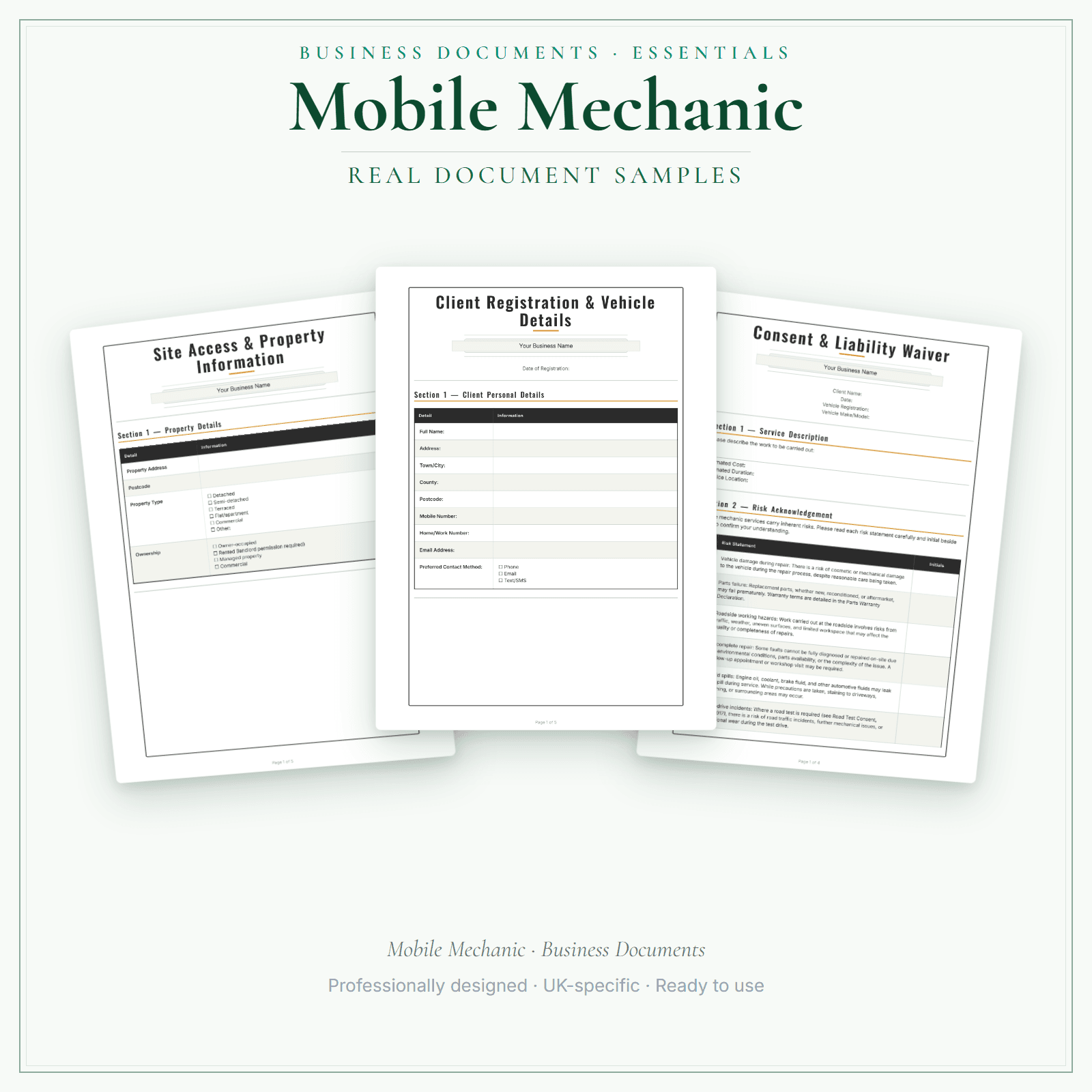
Pages from the Mobile Mechanic Business Documents — Essential.
5 starter business-record templates for Mobile Mechanic businesses, supplied as PDFs with a fillable business-name header. Add your business name, then print the remaining fields to complete by hand or save a flat copy. The exact delivered-file list is shown on this page. These practical templates do not provide legal, clinical or regulatory advice or certification, and do not replace any official records your work requires.
5 PDF templates matching the exact delivered-file list shown on this page
Add your business name in the fillable header, then print or save a flat copy
These practical templates do not provide legal, clinical or regulatory advice or certification, and do not replace any official records your work requires.
Price£5.99
Preview pages
Preview what's inside
In the pack
What's included
- Client Registration Vehicle Details
- Consent Liability Waiver
- Service Agreement Terms Conditions
- Service Record Card
- GDPR Privacy Notice
Preview pages
Who it's for
Who this mobile mechanic pack is for
The Essential pack covers the core 5: client registration with vehicle details, your service terms, a consent and liability form, a service record card and a privacy notice.
- Self-employed mobile mechanics doing servicing, diagnostics and repairs at the customer's home or workplace.
- Mechanics who want each vehicle's details, the agreed work and any road test recorded before the bonnet goes up.
- Mechanics with small fleet customers who want the same records for a business as for a private driver.
Made for the work
Put this product to work.
Choose the included record that fits the task, add the details for your business and check the finished copy before using it. The contents listed above apply to this tier.
Start with a task such as:
Prepare your Consent Liability Waiver using the included template.
Prepare your Service Agreement Terms Conditions using the included template.
Compare the tiers
How the tiers compare
Document contents vary by tier. Check each tier's exact count and included list, as well as its personalisation and editing options. Pick the format that fits how you want to work.
Scroll sideways to compare tiers.
Compare features
You're viewing
Essential
£5.99
5 distinct form types
Premium
£19.99
17 distinct form types
Delivered as
PDF with fillable business-name header; remaining fields print and handwrite
Fillable PDF, DOCX + browser
Add your business name
Change design colours
Add your own logo
Re-word the body text
Type into every document field
Print or save as PDF
Extra software required
A PDF reader for the header
Only to edit the Word files
You're viewing this
- Instant download
- Built in the UK
- One-time purchase
- Secure checkout
- Refund policy
- Support by email
Frequently Asked Questions
How do I receive Business Documents — Essential?
After payment, look for your LaunchKit download email in the inbox you used at checkout. Open its link to your download page and download the files listed for your order. You'll receive a ZIP of PDF forms — each with a fillable business-name header. Print and complete by hand, or save as a flat PDF. Keep a copy of your downloaded files. If the email is missing or a link is not working, check your spam or junk folder, then contact hello@yourlaunchkit.co.uk with your checkout email address and order number, if you have it, for help recovering your files.
Can I edit these files?
Supplied as PDFs with a fillable business-name header. The rest of each form is designed to print or save as a flat PDF. For fully editable Word files (logo + body text) and the fill-online HTML bundle, choose Premium.
Is this legal or tax advice?
No. LaunchKit templates are practical business resources. Review against your own circumstances and check suitability for your business.
Should I start with Essential or Premium mobile mechanic documents?
Essential covers the 5 forms for booking and completing a job. Premium has 17 templates in all and adds the diagnostic consultation, a vehicle inspection checklist, road test consent and a parts warranty declaration.
Can I use these for fleet customers as well as drivers?
Yes. The same client, vehicle and service records work for a business customer's vehicles as for a private driver's car.
Useful next steps
Useful guides for your business.
How to Start a Mobile Mechanic Business in the UK
To start a mobile mechanic business in the UK, define the jobs your van can realistically deliver, understand roadside and private-land limits, insure the work properly, price call-out, diagnosis and…
Read the guide →Essential business documents for UK mobile mechanics in 2026
A UK mobile mechanic needs records that travel with the job: call-out details, diagnostic notes, customer approval, parts ordered, work completed, invoice and warranty limitation note. The goal is…
Read the guide →Mobile Mechanic Expense Tracker UK: Stop Losing the Deductions That Cut Your Tax
This guide covers expense and mileage-record habits for a mobile mechanic, including the 2026/27 55p mileage example. Eligible costs may reduce taxable profit where the rules are met and adequate…
Read the guide →Why LaunchKit
Built for the business you actually run.
Every mobile mechanic pack is checked so its page says exactly what format you get and what each tier includes. Templates are practical resources, not legal or tax advice — review against your own circumstances before use.
Complete your toolkit
More for Mobile Mechanic
Business documents
Business Documents — Premium
17 business-record templates for Mobile Mechanic businesses, each supplied as a fillable PDF and an editable DOCX file. Every template is also included in one fill-online HTML bundle: add your business details and brand colour in the sidebar of each template (they are saved per document, not shared between templates), then send clients a locked copy they can fill in with one click. Answers you haven't changed for 60 days are deleted the next time you open the form, and ‘Prepare copy for clients’ clears them; your business details and colour are kept. Type into the PDF fields or use a DOCX-compatible editor to change the business name, logo and wording. The exact delivered-file list is shown on this page. These practical templates do not provide legal, clinical or regulatory advice or certification, and do not replace any official records your work requires.
£19.99View →
Startup guideStartup Guide
Going self-employed as a mobile mechanic means handling business registration, motor trade road-risk insurance (separate from standard van cover), COSHH procedures for vehicle fluids, waste oil disposal, the difference between a pre-MOT check and an MOT test, and recurring diagnostic subscription costs that the price needs to cover. This guide covers business setup, insurance written for mobile mechanic work, vehicle category boundaries (especially EV/HV high-voltage caution), pricing call-outs versus diagnostics versus repair labour, parts and tool economics, and the first-90-days checklist for moving from workshop tech to a steady mobile round.
£4.99View →
Pricing calculatorPricing Calculator — Premium
UK mobile mechanics can price each repair in this Excel workbook (.xlsx): hours × your hourly rate, plus materials with a markup, plus a fixed fee such as a call-out or travel charge. Add VAT if you choose. The printable quote comes from the Quote Builder and Quote Output sheets, once you replace the example hours, materials and prices. A job log and an expenses tracker keep a dashboard of invoiced, received, progress against your target, expenses and surplus.
£14.99View →