Prepare your Client Order Form using the included template.
Mobile Catering
Mobile Catering Business Documents — Essential
 See all 4 previews
- 5 starter PDF business-record templates for Mobile Catering businesses
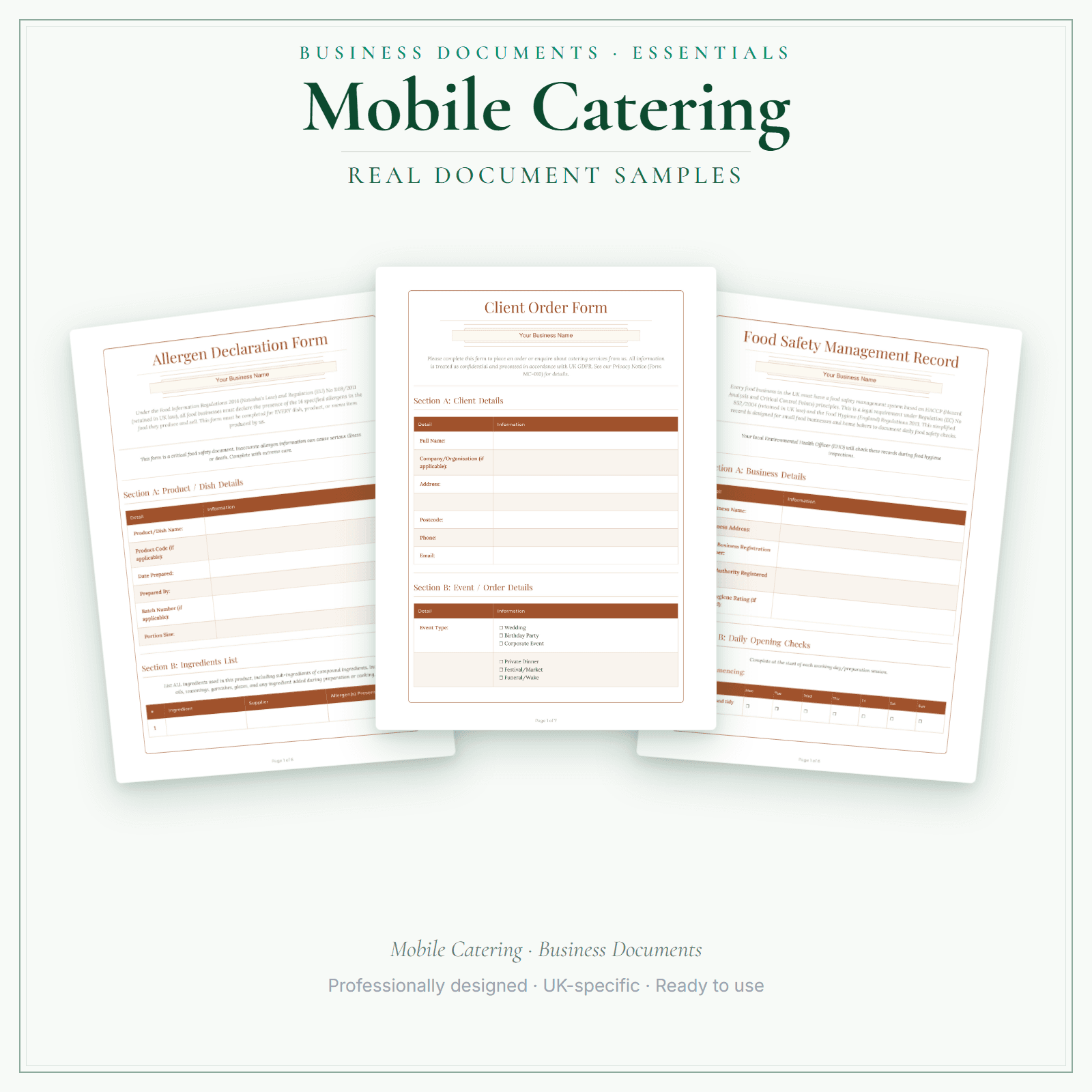
- Includes Client Order Form, Allergen Declaration and Food Safety Management Record, plus 2 more
- PDF + fillable header · Instant access
Digital downloadPDF + fillable headerInstant access
1 / 4
Real-world example
Look inside before you buy.
Pages from the Mobile Catering Business Documents — Essential.
5 starter business-record templates for Mobile Catering businesses, supplied as PDFs with a fillable business-name header. Add your business name, then print the remaining fields to complete by hand or save a flat copy. The exact delivered-file list is shown on this page. These practical templates do not provide legal, clinical or regulatory advice or certification, and do not replace any official records your work requires.
5 PDF templates matching the exact delivered-file list shown on this page
Add your business name in the fillable header, then print or save a flat copy
These practical templates do not provide legal, clinical or regulatory advice or certification, and do not replace any official records your work requires.
Price£5.99
Preview pages
Preview what's inside
In the pack
What's included
- Client Order Form
- Allergen Declaration
- Food Safety Management Record
- Privacy Notice
- Photo Consent
Preview pages
Made for the work
Put this product to work.
Choose the included record that fits the task, add the details for your business and check the finished copy before using it. The contents listed above apply to this tier.
Start with a task such as:
Prepare your Allergen Declaration using the included template.
Prepare your Food Safety Management Record using the included template.
Compare the tiers
How the tiers compare
Document contents vary by tier. Check each tier's exact count and included list, as well as its personalisation and editing options. Pick the format that fits how you want to work.
Scroll sideways to compare tiers.
Compare features
You're viewing
Essential
£5.99
5 distinct form types
Premium
£19.99
16 distinct form types
Delivered as
PDF with fillable business-name header; remaining fields print and handwrite
Fillable PDF, DOCX + browser
Add your business name
Change design colours
Add your own logo
Re-word the body text
Type into every document field
Print or save as PDF
Extra software required
A PDF reader for the header
Only to edit the Word files
You're viewing this
- Instant download
- Built in the UK
- One-time purchase
- Secure checkout
- Refund policy
- Support by email
Frequently Asked Questions
How do I receive Business Documents — Essential?
After payment, look for your LaunchKit download email in the inbox you used at checkout. Open its link to your download page and download the files listed for your order. You'll receive a ZIP of PDF forms — each with a fillable business-name header. Print and complete by hand, or save as a flat PDF. Keep a copy of your downloaded files. If the email is missing or a link is not working, check your spam or junk folder, then contact hello@yourlaunchkit.co.uk with your checkout email address and order number, if you have it, for help recovering your files.
Can I edit these files?
Supplied as PDFs with a fillable business-name header. The rest of each form is designed to print or save as a flat PDF. For fully editable Word files (logo + body text) and the fill-online HTML bundle, choose Premium.
Is this legal or tax advice?
No. LaunchKit templates are practical business resources. Review against your own circumstances and check suitability for your business.
Useful next steps
Useful guides for your business.
How to Start a Mobile Catering Business in the UK
To start a mobile catering business in the UK, register before trading, build food safety around your actual menu, secure pitches and permissions, set up the van, trailer or stall safely, price for…
Read the guide →Essential business documents for UK mobile caterers in 2026
A UK mobile caterer needs documents for event bookings, menus, supplier records, allergen notes, deposits, pitch fees, invoices and daily takings. The useful pack is event brief, menu record,…
Read the guide →Mobile catering prices per head UK: what caterers charge, and how to price your events
One food van caterer's 2026 guide puts weddings at £10–£25 per head plus VAT. Minimum spends of £400–£600 are common.
Read the guide →Why LaunchKit
Built for the business you actually run.
Every mobile catering pack is checked so its page says exactly what format you get and what each tier includes. Templates are practical resources, not legal or tax advice — review against your own circumstances before use.
Complete your toolkit
More for Mobile Catering
Business documents
Business Documents — Premium
16 business-record templates for Mobile Catering businesses, each supplied as a fillable PDF and an editable DOCX file. Every template is also included in one fill-online HTML bundle: add your business details and brand colour in the sidebar of each template (they are saved per document, not shared between templates), then send clients a locked copy they can fill in with one click. Answers you haven't changed for 60 days are deleted the next time you open the form, and ‘Prepare copy for clients’ clears them; your business details and colour are kept. Type into the PDF fields or use a DOCX-compatible editor to change the business name, logo and wording. The exact delivered-file list is shown on this page. These practical templates do not provide legal, clinical or regulatory advice or certification, and do not replace any official records your work requires.
£19.99View →
Startup guideStartup Guide
Launching a mobile catering business means navigating FSA food business registration, local authority environmental health inspections, allergen labelling, gas safety for LPG cooking equipment, food safety procedures based on hazard analysis principles, and street trading licence variation across councils. This guide covers business registration, food safety procedures, allergen and PPDS rules, equipment choices for trailer or van or pitch unit setups, pricing per item with realistic margin, festival and market pitch economics, and the first-90-days checklist for opening your first booked event.
£4.99View →
Financial formsFinancial Forms Bundle — Premium
15 distinct financial record templates for Mobile Catering businesses, each supplied as a fillable PDF and an editable DOCX file. Every template is also included in one fill-online HTML bundle: add your business details and brand colour in the sidebar of each template (they are saved per document, not shared between templates), then send clients a locked copy they can fill in with one click. Answers you haven't changed for 60 days are deleted the next time you open the form, and ‘Prepare copy for clients’ clears them; your business details and colour are kept. Type into the PDF fields or use a DOCX-compatible editor to change the business name, logo and wording. The delivered bundle includes a second invoice template under a legacy filename in both formats; it is not counted or advertised as a separate form type. These are templates, not automated spreadsheet software or accounting, tax or legal advice.
£19.99View →